Microsoft Done.
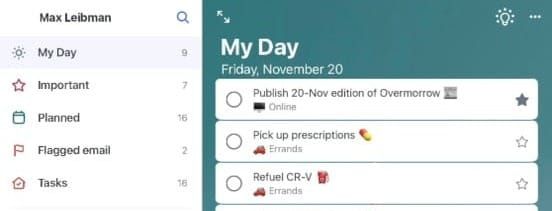
Every morning for nearly a decade, I have opened Microsoft To Do to a mostly blank list and started to draft what my day would look like. But this week the company announced that To Do will be retired on June 30, 2027.
I’ve been an inveterate list-maker for over twenty years, something I got very serious about as a “productivity consultant” selling FranklinCovey day planners in their retail stores and training people how to make better use of their time. I started using Microsoft To Do years later, around 2018; I was by then a project manager in a Microsoft-oriented IT department, and when we implemented Office 365, I was keen to try out and learn every product in the suite. I liked the aesthetics of the app, and the fact that it had clients on computer, web, and mobile made it a drop-in replacement for Apple’s Reminders. I also enjoyed the central conceit of To Do, the simultaneously ever-present and also ephemeral “My Day” view.
My Day shows everything due today as well as anything from any other list that you choose to manually add. On first launch each day, it makes suggestions of other things to add, including items that are overdue, due soon, or that were unfinished from yesterday’s My Day list. At midnight each day, My Day is cleared out, the suggestions pane being the only hint on what may have been on it the previous day. Coming from a day planner background, I didn’t love this lack of history, but I came to appreciate it. Each day was a clean slate.
Much of the rest of To Do comprises the features you would expect from task management apps: tasks can recur and they can have sub-tasks. You can add notes and attachments. And, like so many other apps, due dates that are in the past turn red (red being Esperanto for “overdue”). What really hooked me, aside from the My Day view, was the ability to create shared lists between accounts—even, for a few years at least, between both personal and corporate accounts (a rare instance of Microsoft allowing content between consumer and managed enterprise accounts to mingle). This allowed me to see all of my tasks on a single pane of glass.
To Do saw me through a handful of the most consequential jobs I’ve had, the long-overdue completion of my college degrees, the birth of my second child, and our first purchase of a home. It was what I was using to track my obligations when my mother passed away in 2019, and I still have an overdue reminder to wish her a happy birthday from that fall—an annual recurring task I set the year before, but only once got to tick off as done.
And that’s precisely why I felt like writing about this banal bit of software. Microsoft canceling a relatively unremarkable task manager is not newsworthy. But our work, our commitments, what we think is worth writing down and tracking, and even how we go about doing so—all of this is incredibly personal.
There is no dearth of options to replace To Do, in part because how people want to manage their tasks is so diverse and personal. For example, David Allen, author of the best-selling book Getting Things Done, says that the only tasks that should have a deadline are things that will actually come due, expire, or die by that date—other items are just to be done as soon as you can get to them. iOS developer Marco Arment, maker of the new app Unforgetful, designed his app to require a deadline on every single reminder; on a recent episode of his Accidental Tech Podcast, Arment suggested (and cohost John Siracusa agreed) that if you didn’t have a date, you weren’t serious about it. I fall between the two extremes: some things get due dates because they’re due on that day, some get due dates because I want them to show up on that particular day, and most tasks don’t get a date. You might do something entirely different.
Microsoft To Do is also where I started doing something very idiosyncratic, something that I have seen inspire both huge grins and compliments as well as eye rolling: every single task I put in To Do ends with an emoji. Project management gets a 📋, a reminder to get gas in the morning gets a ⛽, and so on. It started as a way to motivate myself to plan something out I didn’t want to do at all (or maybe a way to procrastinate by taking longer to make the list), but now I can’t stop. When I worked at FranklinCovey, we sold tiny stickers with emoji-like icons to mark up one’s planner. I never got into it, but I can see the appeal now.
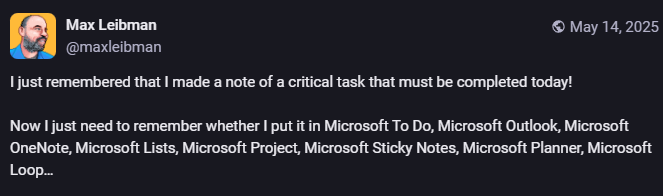
As disappointed as I am about To Do’s demise, it may be seen as an attempt to streamline and rationalize Microsoft’s sprawling set of solutions to track and manage work. Microsoft is pushing corporate users to their collaboration and project management solution, Microsoft Planner, which was also what they offered users of the discontinued Microsoft Project for the Web. However, Microsoft isn’t offering a path to migrate corporate users’ existing data to Planner, and personal users don’t have (and aren’t getting) access to Planner at all. Classic Outlook Tasks will also continue to be supported for users who enjoy not enjoying their software.
For my part, I don’t know for sure where I will go next with my planning and task tracking. I may just switch back to Apple’s Reminders. My wife and I already use Reminders for a shared shopping list. This allows us to shout out items we need to the HomePod in the kitchen, which prompts Siri to automatically fail to recognize who is speaking and direct us to do it on our iPhones anyhow. But Reminders does offer almost everything To Do did, emoji included.
Whether I move to Reminders or somewhere else, though, the task of leaving To Do has a deadline: June 30. For almost ten years, I have recorded a version of my future in this app, writing down my plans and reminders, filling in the details of my imagined day each morning. My accumulated history of completed tasks is there, too, though it is not a day-by-day journal. Like all to do lists, Microsoft To Do has always been about the future. Next year it will become the past.